ExtractMaterials
Description
This tool takes a mesh with multiple material IDs and writes elements of a specific ID to a new mesh. If no ID is specified, meshes are created for each existing material ID.
Usage
USAGE:
   ExtractMaterials  -i <input file name> -o <output file name>
                      [-m <Number specifying the MaterialID>]
                      [--] [--version] [-h]

Where:

   -i <input file name>,  --input <input file name>
     (required)  Name of the input mesh (*.vtu)

   -o <output file name>,  --output <output file name>
     (required)  Name of the output mesh (*.vtu)

   -m <Number specifying the MaterialID>,  --material-id <Number specifying
      the MaterialID>
     The MaterialID for which elements should be extracted into a new mesh.

   --,  --ignore_rest
     Ignores the rest of the labeled arguments following this flag.

   --version
     Displays version information and exits.

    -h,  --help
Displays usage information and exits.Example
In this example we use a 3D mesh (Fig.1) and extract its elements of material ID 3 to create a new mesh.
ExtractMaterials -i mesh_layered.vtu -o mesh_exMatId.vtu -m 3
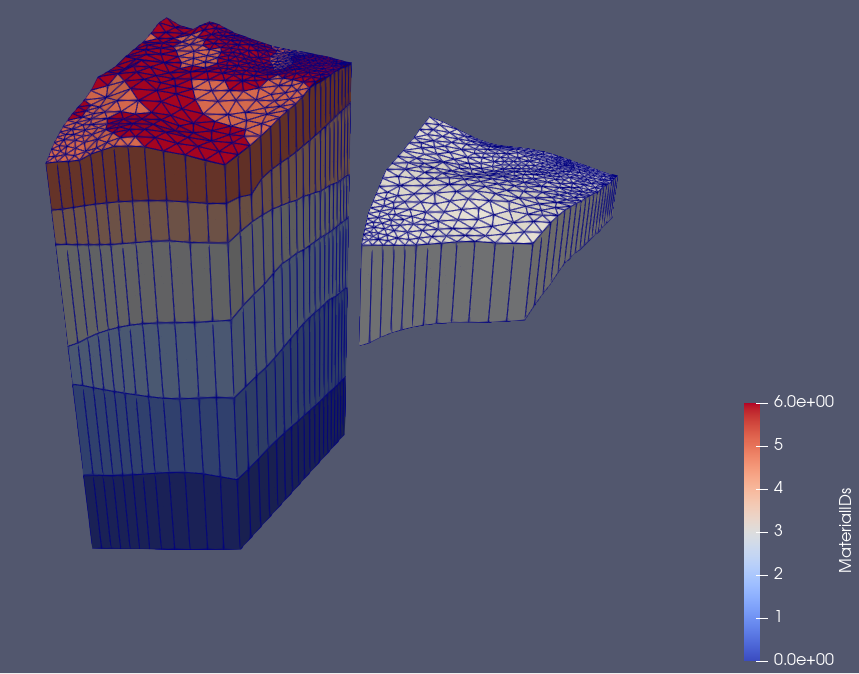
Fig.1 The left side shows a layered 3D input mesh created from raster files using the tool [createLayeredMeshFromRasters](/docs/tools/preprocessing/createlayeredmeshfromrasters/). The different colors depict different material IDs. The z-values of the meshes are scaled by a factor of 10. The right mesh shows the extracted mesh. In this graphic it is translated along the x-axis, its spatial coordinates are not altered by the ExtractMaterials-tool.
This article was written by Julian Heinze. If you are missing something or you find an error please reach out
to us on our forum.
Generated with Hugo 0.164.0
in CI job 825193
|
Last revision: April 20, 2026
Commit: refactor(MeshLib): remove PropertyVector::push_back 870422dde
| Edit this page on