GitLab CI
Introduction
GitLab CI is a powerful Continuous Integration system integrated into GitLab.
The tasks of the CI system are configured in scripts inside the OGS source code
. The entry point is defined in .gitlab-ci.yml
. Scripting and versioning the configuration together with the source code is very powerful, e.g. if you introduce a new OGS CMake configuration in a merge request even the change of the CI jobs configuration or jobs environment (Docker container definition) can be part of the merge request.
GitLab Pipeline
A CI run consists of a pipeline which contains stages which in turn contain jobs. A job runs a set of instructions (e.g. checking out the source code, building the code, testing the code) on a runner .
Each pipeline run is visualized as follows:
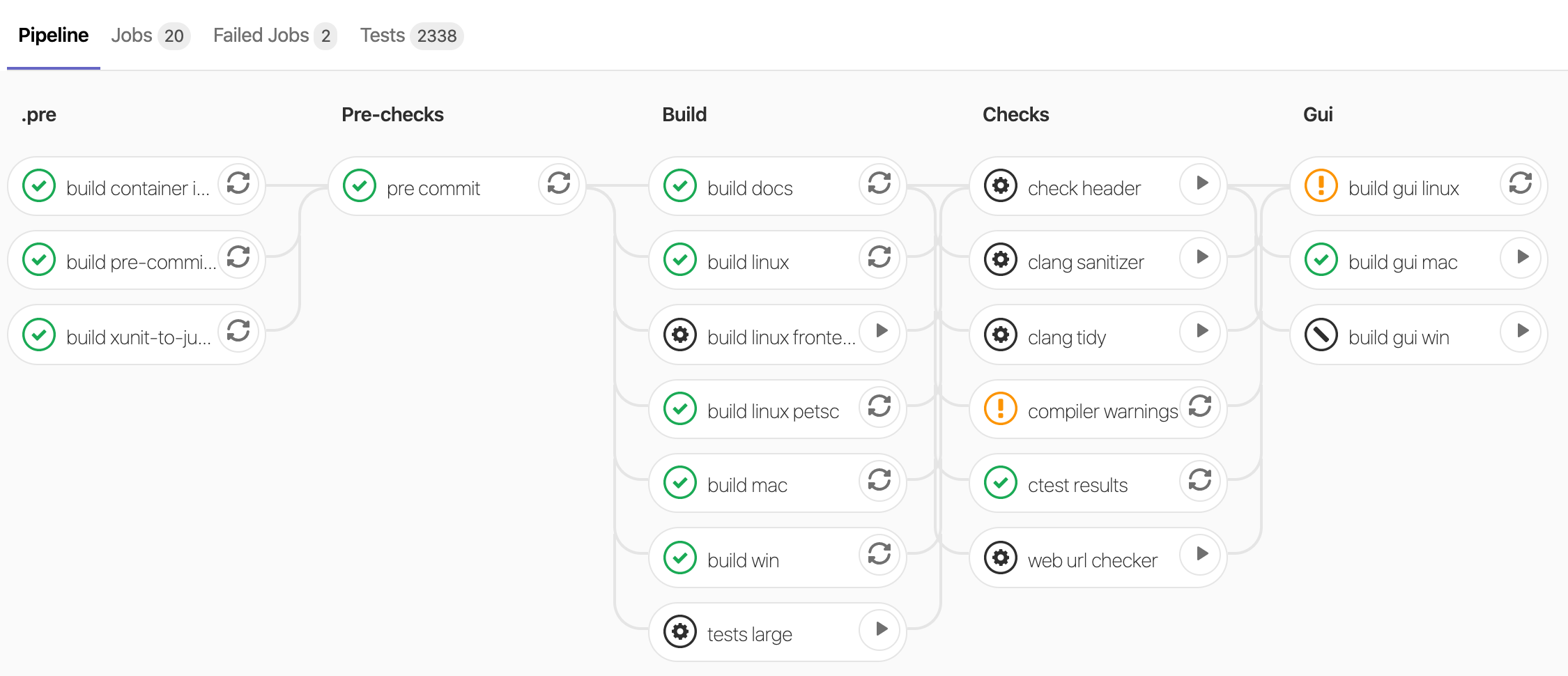
Jobs belong to a stage and each job will get a status (success, warnings, failure). Some jobs are optional (see the gear icon) and can be manually triggered by pressing the play button.
Automatic testing
The master-branch of the main repository as well as all merge requests on that repository are automatically tested. See the pipelines page .
Skip automatic testing
If you want to skip a pipeline run for a push add the -o ci.skip git push option. Example:
git push -o ci.skipOr add [ci skip] to the commit message to skip the pipeline for this commit. Example:
git commit -m "Added feature X [ci skip]"Or use the merge request label ci::skip.
(Temporarily) reduce pipeline run time
During work on MR you may want to reduce the pipeline run time to get feedback faster. Following options are available and can be combined:
Modify CI environment variables in the MR description
Set environment variables used during CI pipeline in the merge request description. The syntax is
CI-variables:
```
CTEST_ARGS="-R pytest"
BUILD_TESTS="false"
```
Possible variables to set:
CTEST_ARGS: Are passed toctestinvocations. Use e.g.-Rto select specific tests (such as your currently worked on benchmark) or-LEto exclude labelled tests.BUILD_TESTS: Disable unit tests (testrunner) when set tofalse.BUILD_CTEST: Disable benchmark / notebook tests when set tofalse.OGSTOOLS_REF: Change OGSTools version used in notebook tests (used by OGSTools CI).
Pre-configured reduced pipelines using MR labels
These pipelines can be selected by using merge request labels:
ci::web only: Runs Jupyter notebook ctests only and builds the web site.ci::web only (fast): Creates a static web site preview without running Jupyter notebook ctests.ci::linux onlyandci::mac onlyandci::win only: Runs platform specific builds only.ci::petsc only: Runs the PETSc builds (useful for testing PETSc-specific changes) and builds a web site preview; the non-PETSc Linux build runs Jupyter notebook ctests only.
More MR labels affecting CI pipelines:
ci_largefor enabling large ctests in merge request pipelines. Combine withci::linux onlyfor faster feedback on the benchmarks.
Manually editing .gitlab-ci.yml and scripts/ci/pipelines/regular.yml (advanced usage)
You can change the pipeline by editing the .gitlab-ci.yml and scripts/ci/jobs/*.yml files. It is good practice to mark these changes with commits starting with drop: ... in the commit message so they can be removed later easily.
All jobs get included in the include:-section in the file scripts/ci/pipelines/regular.yml. You can simple comment out files to disable jobs defined in that files. Please note that some jobs depend on other jobs.
All jobs are defined scripts/ci/jobs/*.yml. You can disable a single job by prefixing its name with a dot, e.g.:
# enabled job:
build linux arch:

# disabled job:
.build linux arch:This article was written by Lars Bilke. If you are missing something or you find an error please reach out
to us on our forum.
Generated with Hugo 0.164.0
in CI job 825193
|
Last revision: April 20, 2026
Commit: refactor(MeshLib): remove PropertyVector::push_back 870422dde
| Edit this page on